
A sales tax payable account tracks tax collected from customers that must be remitted rather than counted as revenue. Reverse tax can calculate the payable amount from tax-inclusive sales when receipts do not clearly separate net sales and tax collected. The account balance depends on taxable sales, refunds, exemptions, jurisdiction rates, marketplace remittance, discounts, shipping, filing periods, and reconciliation against POS or accounting reports. Wrong separation can overstate revenue.
When the business pays the tax authority, Sales Tax Payable is debited and cash is credited.
What Happens to Sales Tax Payable?
Reverse tax can create or correct the sales tax payable amount by separating collected tax from gross receipts. The payable account should represent tax collected or owed to the tax authority, not ordinary revenue. If gross sales were booked without separation, reverse tax can help identify the liability portion.
When a business collects sales tax:
Debit cash or accounts receivable for the full customer total.
Credit revenue for the pre-tax sale amount.
Credit Sales Tax Payable for the collected tax.
Example:
Customer pays: $108.00
Tax rate: 8%
Revenue: $100.00
Sales Tax Payable: $8.00
What Is the Sales Tax Payable Account?
Sales tax payable is a liability account. It tracks tax collected from customers that the business expects to remit or settle, depending on the applicable rules and reporting system. It should not be treated as earned revenue simply because it passed through the bank account.
Sales Tax Payable is a liability account. It tracks sales tax collected from customers but not yet remitted to the tax authority.
It is not a revenue account. It is not normally an expense account at the time the sale is made. It is a clearing account between customer collection and tax remittance.
How Does Reverse Tax Create the Payable Amount?
Reverse tax creates the payable amount by calculating the tax included inside a gross tax-inclusive total. The net amount can be posted to revenue, while the included tax can be posted to sales tax payable. This works only when the gross total is clean and the rate is correct.
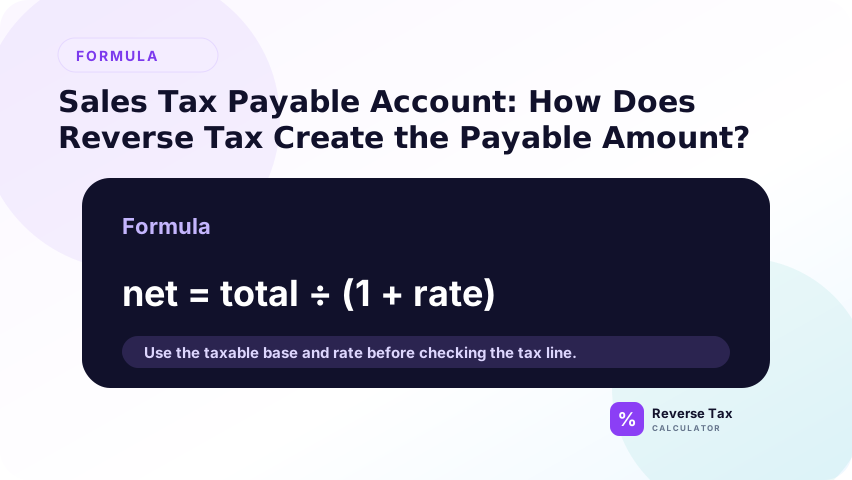
If the sale total already includes tax, reverse tax identifies the tax part.
Formula:
Pre-tax revenue = Tax-inclusive total divided by (1 plus rate)
Sales Tax Payable = Tax-inclusive total minus pre-tax revenue
This matters when point-of-sale systems, invoices, bank feeds, or marketplace exports show tax-inclusive amounts.
Journal Entry When Sales Tax Is Collected
Example sale:
Tax-inclusive total: $540.00
Rate: 8%
Revenue = $540.00 divided by 1.08 = $500.00
Tax = $40.00
| Account | Debit | Credit |
|---|---|---|
| Cash | $540.00 | |
| Sales Revenue | $500.00 | |
| Sales Tax Payable | $40.00 |
The payable account increases because the business has collected tax.
Journal Entry When Sales Tax Is Remitted
When the business pays the tax authority:
| Account | Debit | Credit |
|---|---|---|
| Sales Tax Payable | $40.00 | |
| Cash | $40.00 |
This reduces the liability. It does not reduce revenue because the tax was not recorded as revenue in the first place.
What If the Business Recorded the Whole Total as Revenue?
If the whole gross total was recorded as revenue, revenue may be overstated and sales tax payable may be understated. Reverse tax can support a correcting entry by separating the tax portion. The correction should be tied to source reports, not only to a calculator result.
Then revenue is overstated and Sales Tax Payable is missing or understated.
Correction example:
Original incorrect entry:
Cash debit $108.00
Sales revenue credit $108.00
Correct split should be:
Sales revenue $100.00
Sales Tax Payable $8.00
Adjustment:
Debit Sales Revenue $8.00
Credit Sales Tax Payable $8.00
How Do Refunds Affect Sales Tax Payable?
If a customer receives a taxable refund and the sales tax is refunded too, reverse the original split.
Example refund:
Refund total: $108.00
Rate: 8%
Revenue reversal: $100.00
Tax payable reversal: $8.00
| Account | Debit | Credit |
|---|---|---|
| Sales Returns or Revenue | $100.00 | |
| Sales Tax Payable | $8.00 | |
| Cash | $108.00 |
This reduces the payable because the business no longer owes tax collected from that customer, subject to filing rules.
How Do Multiple Rates Affect Sales Tax Payable?
Each rate group creates its own tax amount. The accounting system may post all of them to one Sales Tax Payable account or to subaccounts by jurisdiction.
| Jurisdiction group | Tax-inclusive total | Rate | Revenue | Payable |
|---|---|---|---|---|
| State and local A | $1,080.00 | 8% | $1,000.00 | $80.00 |
| State and local B | $537.50 | 7.5% | $500.00 | $37.50 |
| Exempt | $200.00 | 0% | $200.00 | $0.00 |
| Total | $1,817.50 | Mixed | $1,700.00 | $117.50 |
Subaccounts help reconcile filings by state, county, city, or tax agency.
Single Liability Account
One account is simpler, but it can make state-by-state filing harder.
Jurisdiction Subaccounts
Subaccounts make reconciliation easier when the business files in multiple states or localities.
Tax Agency Mapping
Accounting software should map collected tax to the correct tax agency when possible.
What If Marketplace Facilitators Collect the Tax?
Some marketplaces collect and remit sales tax on behalf of sellers. In those cases, the seller may not owe the same payable amount, even though tax appears in the customer order.
Separate:
- Tax collected by seller
- Tax collected and remitted by marketplace
- Marketplace fees
- Seller payout
Reverse tax can identify tax in the customer price, but marketplace reports decide whether it belongs in the seller's Sales Tax Payable account.
Example: Seller-Collected Tax vs Marketplace-Collected Tax
Seller-collected tax and marketplace-collected tax should not always flow to the same payable account. If the seller collected the tax, it may create a payable. If a marketplace collected and remitted the tax, the seller may need a separate reporting or clearing treatment instead of recording it as their payable.
Seller website sale:
Customer total: $108.00
Revenue: $100.00
Seller Sales Tax Payable: $8.00
Marketplace order:
Customer total: $108.00
Revenue: $100.00
Marketplace-collected tax: $8.00
Seller payout may exclude the $8.00 tax. In that case, posting the $8.00 to the seller's payable can double count the liability.
How Do Discounts Affect Sales Tax Payable?
Discounts affect payable when they change the taxable base. A pre-tax seller discount can reduce the tax collected and therefore reduce payable. A manufacturer reimbursement or post-tax credit may not reduce the same base. The payable entry should follow the tax shown on the source transaction.
Discounts affect the taxable base and therefore the payable amount.
If a retailer discount reduces the base from $100.00 to $80.00 at 8%, payable is $6.40. If a manufacturer coupon keeps the taxable base at $100.00, payable may be $8.00.
The payable follows the taxable base, not always the cash paid by the customer.
How Do Tips and Service Charges Affect Sales Tax Payable?
Optional tips may not be part of the taxable base, while mandatory service charges may be treated differently depending on rules and receipt structure. The payable account should reflect tax on the taxable base, not necessarily the final card charge that includes gratuity.
Optional tips are usually separated from the taxable sales base in many receipt workflows. Mandatory service charges may be included in taxable gross receipts depending on the jurisdiction.
If a charge is taxable, it can increase Sales Tax Payable. If it is not taxable, it should not.
How Do Adjustments Affect Sales Tax Payable?
Adjustments affect Sales Tax Payable only when the seller-collected tax liability changes. Refunds, voids, exempt corrections, marketplace reclassifications, and filing adjustments can increase or decrease the account. Fees, tips, processor deductions, and payout timing usually explain cash differences but do not automatically change payable. Each adjustment should identify source transaction, tax amount, reason, and supporting report.
Adjustments such as refunds, chargebacks, discounts, marketplace corrections, and voids can increase or decrease payable. Each adjustment should be matched to the original transaction when possible so the tax portion is not double-counted or omitted.
Sales Tax Payable should change when the tax obligation changes.
Refunds
Refunded tax can reduce the payable if the customer receives the tax back and the jurisdiction allows the adjustment.
Voids
Voided transactions should usually remove both revenue and tax from the books.
Bad Debts
Bad debt sales tax treatment varies by jurisdiction. Do not reduce payable without checking the rule.
Rounding Adjustments
Small rounding differences may need a rounding account or penny adjustment so the ledger matches the filed return.
Decision Matrix: Should It Increase Sales Tax Payable?
| Amount | Increase payable? | Reason |
|---|---|---|
| Tax collected by seller | Yes | Liability to remit |
| Pre-tax sale amount | No | Revenue |
| Optional tip | Usually no | Not sales tax |
| Refunded tax | Decreases payable | Tax returned to customer |
| Marketplace-collected tax | Maybe no | Marketplace may remit |
| Taxable service charge | Yes | Part of taxable base |
Reconciliation Workflow for Sales Tax Payable
| Step | Action | Goal |
|---|---|---|
| 1 | Start with sales report | Source transactions |
| 2 | Separate tax-inclusive totals | Revenue and payable |
| 3 | Group by jurisdiction | Filing support |
| 4 | Subtract refunded tax | Correct liability |
| 5 | Remove marketplace-remitted tax if applicable | Avoid double liability |
| 6 | Compare to tax return | Filing reconciliation |
| 7 | Clear payable when paid | Close liability |
Common Sales Tax Payable Errors
| Error | Effect | Fix |
|---|---|---|
| Crediting revenue for tax | Overstates revenue | Credit payable |
| Debiting expense at remittance | Understates profit | Debit payable |
| Ignoring refunds | Payable too high | Reverse refunded tax |
| Recording marketplace tax as seller payable | Double counts liability | Use facilitator report |
| One payable for all states with no detail | Hard to file | Use subaccounts or tracking |
Information Gain: Payable Is a Timing Account
The key information gain is that sales tax payable is about timing and obligation, not just calculation. Money can enter the bank account before it is remitted, corrected, refunded, or cleared. Reverse tax helps identify the tax portion, but account movement depends on the transaction lifecycle.
Sales Tax Payable is not just a formula result. It is a timing account.
It increases when tax is collected, changes when refunds or adjustments happen, and decreases when tax is remitted. Reverse tax is the method that creates the initial split, but reconciliation is what keeps the liability accurate over time.
How Should Sales Tax Payable Be Reviewed at Month End?
At month end, compare the payable balance with tax reports, source sales records, refund records, marketplace collection reports, and prior remittances. The review should explain beginning balance, tax collected, adjustments, payments, and ending balance. Unexplained differences should not be forced into revenue.
Month-end review should compare three numbers:
- Tax collected according to sales reports
- Sales Tax Payable in the general ledger
- Tax due according to the filing report
If these do not match, inspect refunds, marketplace orders, exempt sales, timing differences, and manual journal entries.
What Records Support the Payable Balance?
Support should include receipts, invoices, POS summaries, marketplace reports, refund logs, rate evidence, journal entries, and reconciliation notes. These records connect the payable balance to source transactions and help explain why tax was separated from revenue.
Keep transaction reports, return reports, rate tables, exemption support, marketplace statements, refund logs, and payment confirmations. IRS Publication 583 emphasizes that records should support reported business amounts. For sales tax payable, the support should explain why the liability increased, decreased, or cleared.
Example: Payable Rollforward
A payable rollforward explains the account from the beginning of the period to the end.
| Line | Amount |
|---|---|
| Beginning Sales Tax Payable | $500.00 |
| Tax collected this month | $1,600.00 |
| Refunded tax | ($80.00) |
| Tax remitted | ($1,450.00) |
| Ending Sales Tax Payable | $570.00 |
The ending balance should make sense based on unpaid tax still owed after the latest filing or payment.
Why Reverse Tax Helps Clean Up Old Balances
Reverse tax helps clean up old balances when historical gross sales were recorded without a tax split. It can estimate the included tax portion from known rates and totals, then support reclassification. The cleanup should still be reviewed against source documents and rate evidence.
Old Sales Tax Payable balances often come from tax-inclusive sales posted incorrectly. Reverse tax can rebuild the original split when the rate and transaction total are known.
This is a cleanup tool, not a magic correction. If rates, jurisdictions, refunds, or marketplace remittance are unknown, the adjustment should be labeled and reviewed before posting.
Trust Boundary
This page explains accounting mechanics around reverse tax and sales tax payable. It does not determine whether tax should have been collected, whether marketplace facilitator rules apply, or how a tax return should be filed. Use accounting records and official guidance for compliance-sensitive decisions.
this page explains bookkeeping mechanics. It does not decide whether a seller has nexus, whether a marketplace is responsible for remittance, or which filing line applies.
Verify with official state or local guidance and an accounting professional before filing.
For the entry workflow, use separating sales tax for bookkeeping.
If the issue is revenue classification, review separating revenue from collected tax.
If refunds changed the liability, compare the account with a reverse tax refund example.
Frequently Asked Questions
Is Sales Tax Payable a liability?
Yes. It tracks tax collected but not yet remitted.
Does reverse tax increase Sales Tax Payable?
Reverse tax identifies the tax amount that should be credited to Sales Tax Payable when tax is collected by the seller.
What happens when sales tax is paid?
Debit Sales Tax Payable and credit cash.
Should marketplace tax go into Sales Tax Payable?
Only if the seller is responsible for remitting it. Marketplace facilitator reports must be reviewed.
Is sales tax remittance an expense?
Usually no if the tax was recorded as a liability when collected.
Sources and Notes
- Formula source: arithmetic relationship between tax-inclusive total, pre-tax revenue, sales tax, and rate.
- IRS Publication 583, Starting a Business and Keeping Records
- Accuracy note: verify state, local, and marketplace facilitator rules before filing or adjusting liability balances.